Why you can trust TechRadar
We spend hours testing every product or service we review, so you can be sure you’re buying the best. Find out more about how we test.
There was a moment late last year when I thought I’d lost my wallet. I searched everywhere, in every nook and cranny. It was nowhere. I began walking through all the steps I’d have to take to secure my life; my IDs, my credit cards, even some memories stuffed inside. I was, for a moment, devastated. Then I remembered something: I’d had the wallet on me the other day when I briefly wore a pair of pants… then I switched into shorts.
The wallet was in the pocket of those pants, folded, and laying a shelf in my closet. Now, if I’d had an AirTag on it, I could’ve located the wallet with some ease. The irony is that this wallet came with a perfect circle cut-out to hold Apple’s popular tracking tag. After that scare, I decided to slip an AirTag in, and now I can find it in my house.
And if I had the new AirTag (Second Generation or AirTag 2), I’d find it even more easily – because, as promised, it’s got far better range, and can chirp loud enough that you can easily hear it from a room away.
Apple AirTag 2: Price and availability
- $29 / £29 / AU$49
- Available now at Apple Store and retail
Apple AirTag 2: Setup
Image 1 of 2

If you own one of the best iPhones, setting up the new AirTag is as easy as it was with the original tracking disc. After unpacking the AirTag, I pulled the thin plastic covering off and then tugged until the tiny bit of embedded flexible plastic pulled out of the AirTag.
With that, the AirTag started looking for its iPhone mate. My iPhone 17 Pro Max, which was sitting nearby, immediately detected the AirTag and lit up. On-screen steps guided me through the process of pairing it with the phone and naming the tag (you typically choose a name that aligns with what you want to track, so ‘Backpack,’ ‘Luggage,’ etc.).
There’s also a pretty stern warning about how AirTags are not intended to be used to track people without their consent. The new AirTags support all the same privacy features, like alerting you if an unknown AirTag is somehow on your person. Plus, if the AirTag is separated from its owner for an extended period, it will start making noise.
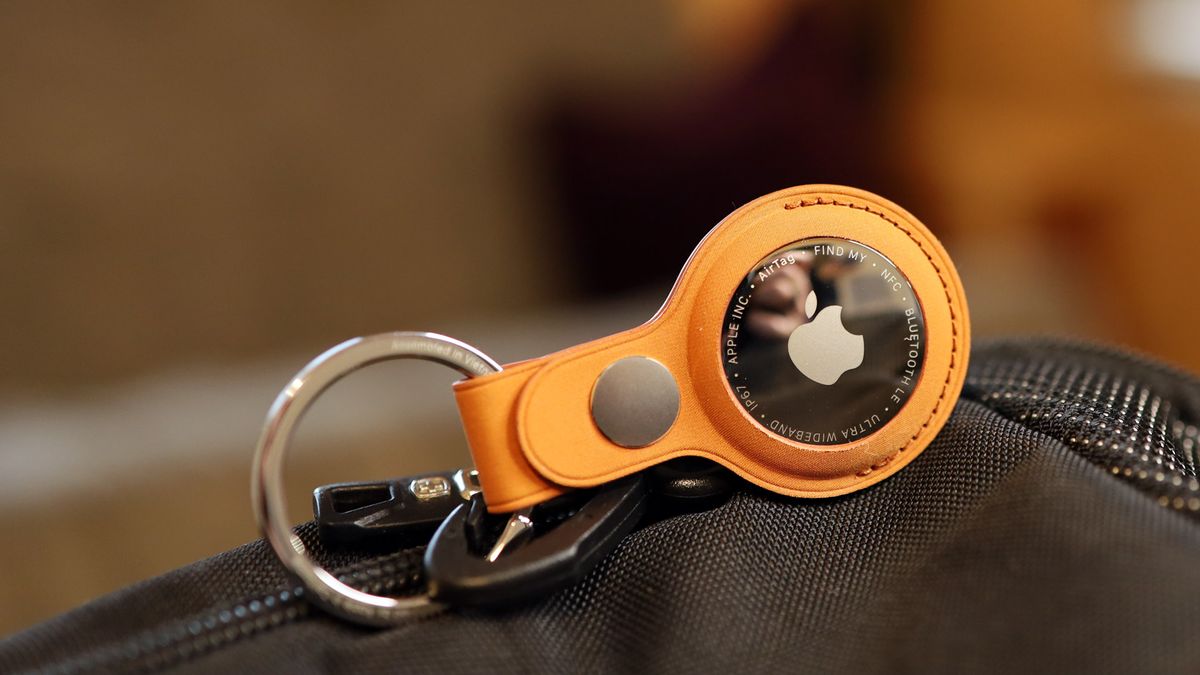
Since Apple sent me one of its $35 / £40 / A$59 FineWoven Key Rings, I slipped the AirTag into it and attached it to my backpack.
Apple AirTag 2: Test drive
From the outside, the Apple AirTag 2 is indistinguishable from the original AirTag launched in 2021, but inside it’s a whole different story.
Apple replaced significant components, including the ultrawideband chip, which now matches what we’ve had in the iPhone since 2023 (iPhone 15), and new speakers. Both of these changes are critical to the AirTags 2’s biggest updates.
When I learned about the new Apple AirTag, I noted Apple’s claims of 1.5x better range and a 50%-louder speaker with some skepticism. Those sounded like big leaps, and I wondered, at first, how I might test them.
The answer was simple, and it resided in my wallet. I simply compared the original AirTag to this new and improved one.

Finding things near and far
The AirTag is useful for finding stuff you’ve misplaced in your home, but even more impactful when you, or say, your airline has misplaced your luggage, for example. Apple has partnered with dozens of airlines that can now use an AirTag to help locate your lost luggage and let you know it’s been found; a reunion with your luggage should soon follow.
Like the original AirTag, the new one can tap into a network of one billion Apple devices to phone home. Basically, an AirTag separated from its owner can ping, for instance, a nearby iPhone, and that connects with the iCloud network to deliver the AirTag’s location information (based on that original iPhone’s location) back to the owner in the Find My app. All of this information is delivered anonymously, and it’s also end-to-end encrypted.
A locally misplaced item can be found via the AirTag’s ultrawideband capabilities.

To be clear, I had no intention of losing my wallet or backpack, but I thought I could test out the new range and audio capabilities.
My house is about 40ft front to back and 50ft diagonally from one corner to the other. I placed my backpack with both the AirTag 1 (in my wallet) and the AirTag 2 in one corner, and then I walked to the opposite, far corner of my house.
In the FindMy app, I started by selecting my wallet and then choosing ‘Find’ to launch Precision Finding. The app reported that my wallet was ‘far’ and, though connected, said the signal was weak and suggested I move to a different location.
Image 1 of 2


I started walking in the direction of the wallet and AirTag 1. When I was almost two-thirds of the way to its location, the Find My interface picked up the wallet at 22ft away, but could not identify the direction.
It wasn’t until I was within six feet of the AirTag 1 that I got directional information, which is a giant white arrow on a green background that points you to your missing bag, wallet, or whatever.
Next, I returned to the far corner of my house and selected the backpack, in which I had placed the AirTag 2.
Even from that location, the phone connected to the AirTag and told me it was 47 feet away. By the time I was just a third of the way across my home (roughly 32ft), Find My started displaying directional information – a significant improvement over the original AirTag.
I reran the test with the wallet and backpack AirTags fully exposed, and the results were the same.
Sound off
The new AirTags are also advertised as being significantly louder than the original tags, thanks to new speakers.
Keeping the AirTags in the same location, I first selected the wallet AirTag in Find My devices and then chose ‘Play Sound’. I heard the familiar two-tone sound.
From inside my backpack, I could just make out the muffled dat-dat-da-dat-dat, which plays three times before ceasing.
I made sure the AirTag 2 was similarly seated inside the backpack, and then selected ‘Play Sound’ for that AirTag. The difference in volume was stark; I could hear it clearly, even over the din of a nearby television. Impressive.
Watch this

The new AirTag also works with the Apple Watch (Series 9 and above or Ultra 2), though enabling it was slightly less intuitive than I’d prefer.
To add an AirTag to your Apple Watch, you open the Control Panel, hit Edit, and then select ‘Find AirTag’. The system walks you through selecting a compatible AirTag, in my case, the backpack one, and once that’s done it’s just a press of your Apple Watch Side Button and a tap on the Find AirTag icon to launch a search for that item.
When I did it on my Apple Watch 9, the screen immediately transformed into a searching graphic similar to what I see in the iPhone Find My app’s Precision Finding feature. It instantly showed me how many feet I was from the backpack, and when I started walking toward it, it switched to a circular wayfinder, with one portion of the circle turning bright white to indicate the proper direction. When I arrived at the backpack and its AirTag, the screen turned green with a bright check mark.
While I can’t test battery life, you’ll be pleased to know that the new AirTag uses the same CR2032 3-volt lithium coin battery, and is rated to last a year. Finally, the IP67 rating remains, which means the AirTag (2026) can handle splashes of water (rain) and dust.
Overall, this is an excellent little update that retains all that’s good about the original AirTag, and updates crucial features to make them much more useful when you’re trying to find your lost item. And Apple earns extra points for not raising the price or altering the design, which might have forced you to buy new AirTag accessories.